
Standards that keep up with your projects.
Find the best details and families worth standardizing, approve them in one place, and keep every project current. Your standards library grows from real project work.
Make your best work the default.
Pirros turns the details and families your teams trust into firm standards everyone can find.

Built from the work you’ve already done
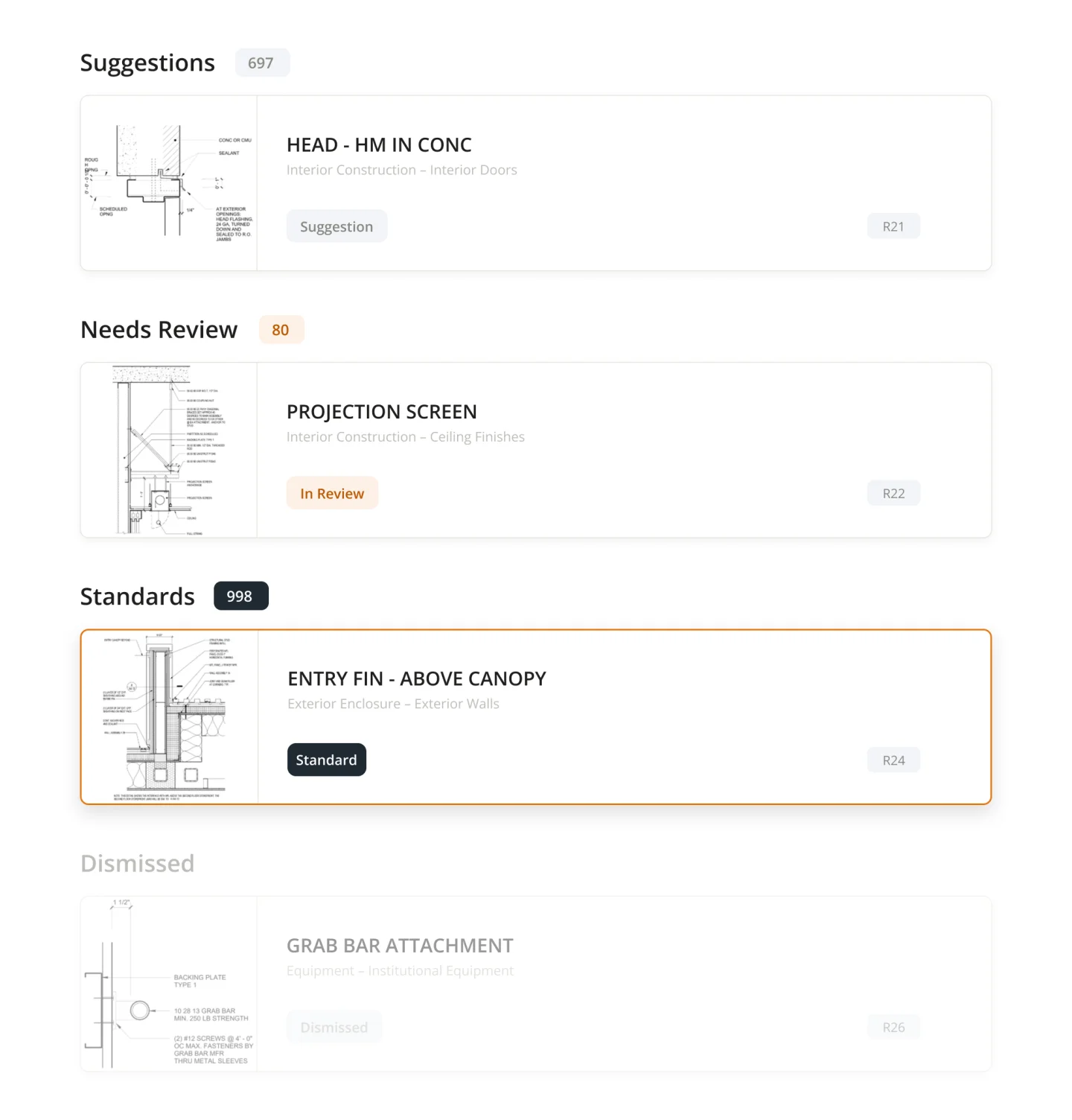
Library Builder suggests the best candidates for new standards and shows where your library has gaps.

See how standards hold up on real projects
Track what’s used across offices and check projects against your standards, specs and code.

The right detail & family, first in search
Approved content ranks above everything else, so teams reach for the right version without thinking about it.
Find the next great additions to your firm’s standards library.
- Library Builder recommends new standards based on project history, reuse, and detail quality.
- Identify gaps in your standards library and see where to focus your attention.
- Review, approve, or dismiss recommendations while Pirros handles the work of finding them.
From project work to firm standards, all in one place.
- Let architects flag details and families they think should become firm standards.
- Review content, add markups and comments, and manage approvals in one place.
- Turn great work from across the firm into a growing library of vetted standards.
Make your trusted content easy to find and use.
- Make details and families from across your firm’s projects searchable without manual tagging.
- Give teams direct access to trusted content inside Revit, reducing repetitive requests.
- Keep approved content current with version tracking, updates, and access controls.
Know what’s being used across the firm.
- Track which details and families teams use across projects and offices.
- Spot non-standard content, gaps in your library, and opportunities for improvement.
- Make informed decisions about what to standardize, update, or retire.
Bring your standards into active project reviews.
- Check project work against firm standards, code requirements, and specifications.
- Give teams clear, actionable findings they can resolve in Revit.
- Track model health over time to catch potential problems earlier.

Results
Firms like yours, already seeing the difference.
400+
Firms globally building on Pirros
1,000+
Hours recovered annually
4.2M+
Assets made searchable
30+
Hours saved per project
How David Baker Architects built a library its teams trust
With Pirros, David Baker Architects vetted the details that kept repeating across its projects, turning past drawings into reusable content that the whole firm reaches for first.
- 700%
- Increase in vetted library content
- $180K
- Annual time savings

"We use Pirros as a tool to vet details. The details filter into our Revit template, and then back into Pirros. It's a feedback loop that keeps everything organized and current."
Orrin Goldsby
Architect at DBA

One platform for every part of the drawing set

Platform Overview
The AI design platform that allows you to find, trust, and build on everything your firm has ever solved.
Learn moreDetail Management
Find any detail your firm has ever drawn, including live 3D details tied to the model.
Learn moreFamily Management
AI-powered computer vision to search and quickly download Revit families.
Learn more
Review & Collaboration
Share feedback and markups, and hand off instantly to teammates.
Learn more
Connections
The Pirros MCP for Claude and ChatGPT, the API for your own apps, and Pirros inside Revit.
Learn more
Put your firm’s knowledge to work.
Set up a time with our team and see Pirros for yourself. Or start with Mira for Revit, which is free.