
Your firm’s details and families, in every tool you use
The Pirros MCP lets Claude or ChatGPT search your firm’s details and families. The Pirros API brings them into your own apps and reports, and Pirros in Revit puts them in a sidebar inside Revit.
One library, wherever your team works

AI assistants
Through the Pirros MCP
Claude
Ask for your firm’s details and families in a Claude chat, and get the drawings back.
ChatGPT
Search your library from ChatGPT, in the conversation you’re already having.
Cursor
The same search in the AI code editor, for the people building your firm’s tools.
Codex
The same search in OpenAI’s coding agent.

Your own tools
Through the Pirros API, built by your team
Power BI
Report on your firm’s details and families, through a connection your data team builds on the API.
Your own apps and Revit add-ins
Search, open and download details and families from your own code.

Revit
Pirros and Mira, inside Revit
Pirros in Revit
Search your firm’s details, families and standards from a sidebar in Revit, and drag what you need into your model.
Mira for Revit
The AI agent that works inside Revit. Free to download.
Built for every role in the firm

BIM and design technology leaders
Decide what each AI connection and API key can reach, and build your details and families into your own dashboards and add-ins.

IT and security teams
Every AI connection and API key is limited to the workspaces and actions you choose. New AI credentials start closed until you turn them on, and you can revoke one at any time.
Everyone who never opens Revit
Project managers, principals and spec writers ask for the firm’s details in Claude or ChatGPT, and get the drawings back in the same conversation.
Ask for your firm’s details in Claude or ChatGPT
The Pirros MCP connects the AI assistant your firm already uses to its details and families in Pirros. People ask in plain English, in the conversation they’re already having, and get the drawings back without opening Revit or asking a colleague where to look.
- “Do we already have a 36-inch flush door family?” Ask before anyone builds a new one
- It searches, opens and downloads, and creates stashes. It never edits a detail or family
- Works in Claude, ChatGPT, Cursor and Codex
- More in the Pirros MCP launch post
Illustration: someone asks an AI assistant connected to Pirros whether the firm already has a 36-inch flush door family. It answers with the firm’s typical family and flags a near-duplicate in an older Revit version. The names are made up for this page.
Your admin decides what each connection reaches
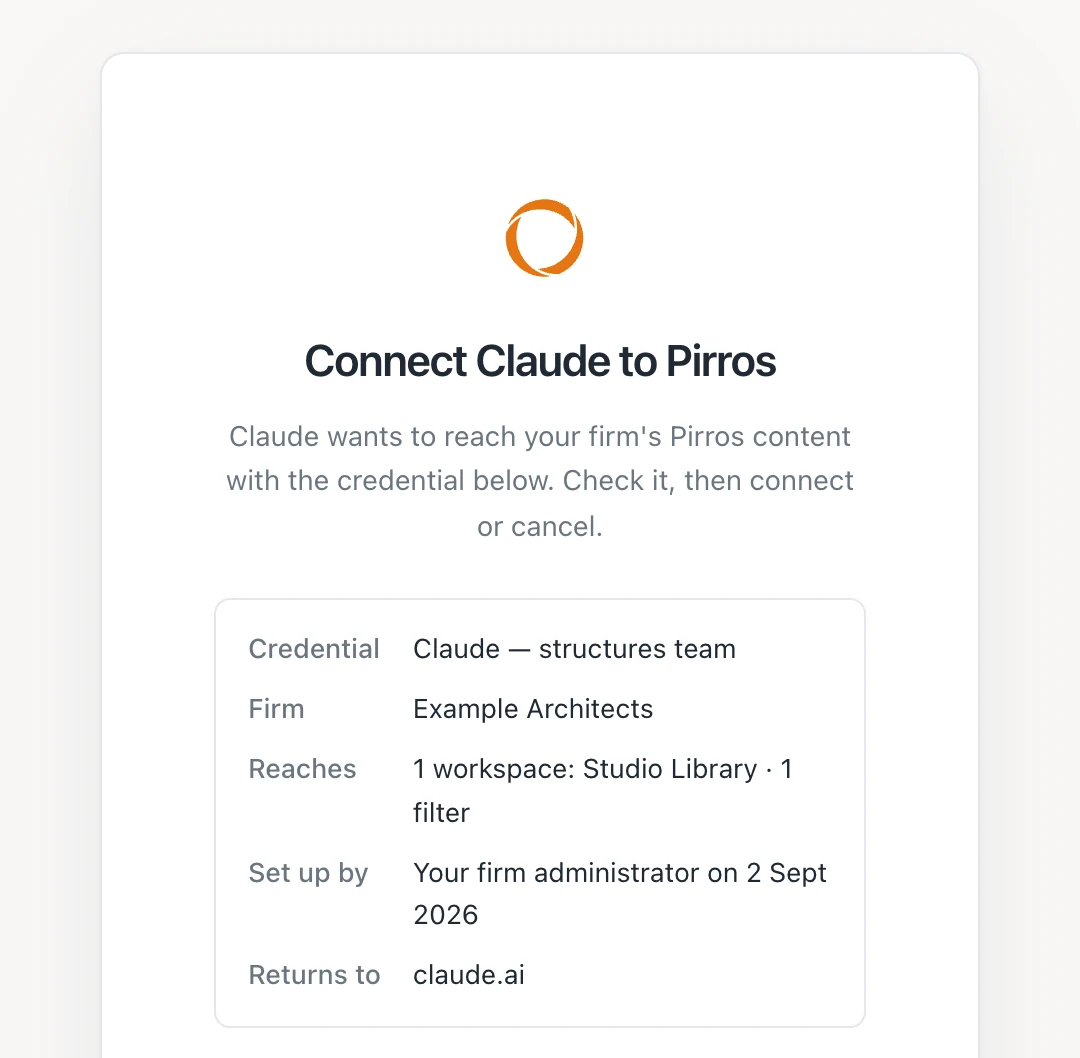
Your admin sets up the Pirros MCP once, not person by person: a credential for each AI tool, limited to the workspaces and actions it needs. Everyone who connects with it gets that same reach, so set one up per team. People connect from their own assistant and approve it on a Pirros consent page.
- New credentials start closed, until your admin turns connections on
- Narrow one to part of a workspace, such as your typical details
- Disconnect everyone on a credential, or revoke it, at any time
- Setup, step by step: Connect your AI assistant to Pirros
Pull your details and families into your own tools
Your design technology or data team can build on the same data with code, for a Power BI report of the firm’s details or a Revit add-in. Admins limit each API key the same way as an MCP credential, by workspace, filter and action.
- Search details and families, and read stashes and tags
- Download detail PDFs, Revit files and families
- Look up a family’s version history and what nests it
- Developers start from the API reference
Illustration: a request to the Pirros API searching a workspace’s details for “curtain wall head”, and the first result coming back as JSON with its sheet number, detail number, scale, Revit version and a link to its PDF.
Trust
Enterprise-grade security and controls
SOC 2 Type II certified. GDPR and CCPA compliant. Zero AI training on your data. Built for the confidentiality demands of the world’s leading design practices.
Trust and securityPrivate workspaces
Your knowledge is isolated to your firm. Nothing crosses between customers.
Robust security and permission sets
Role-based access and reference-only controls that hold everywhere, including inside Revit.
What’s included in Pirros Connections?
What is an MCP?
Which AI assistants work with the Pirros MCP?
Can the AI change our details or families?
How is the Pirros MCP different from Mira?
Does Pirros train AI on our drawings?
How do we get Pirros Connections?

One platform for every part of the drawing set

Platform Overview
The AI design platform that allows you to find, trust, and build on everything your firm has ever solved.
Learn moreDetail Management
Find any detail your firm has ever drawn, including live 3D details tied to the model.
Learn moreStandard & Project Content
Promote the details and families your projects repeat into vetted firm standards.
Learn moreFamily Management
AI-powered computer vision to search and quickly download Revit families.
Learn moreReview & Collaboration
Share feedback and markups, and hand off instantly to teammates.
Learn more