AI for Revit: The Best AI Tools and Plugins in 2026
The AI tools for Revit worth knowing in 2026, grouped by the job they do, with what each one reads and changes in your model and who approves the change.

Revit 2027 ships with its own AI assistant, and there's a growing list of add-ins that want a place on your ribbon. Which AI tools deserve to be part of your workflow?
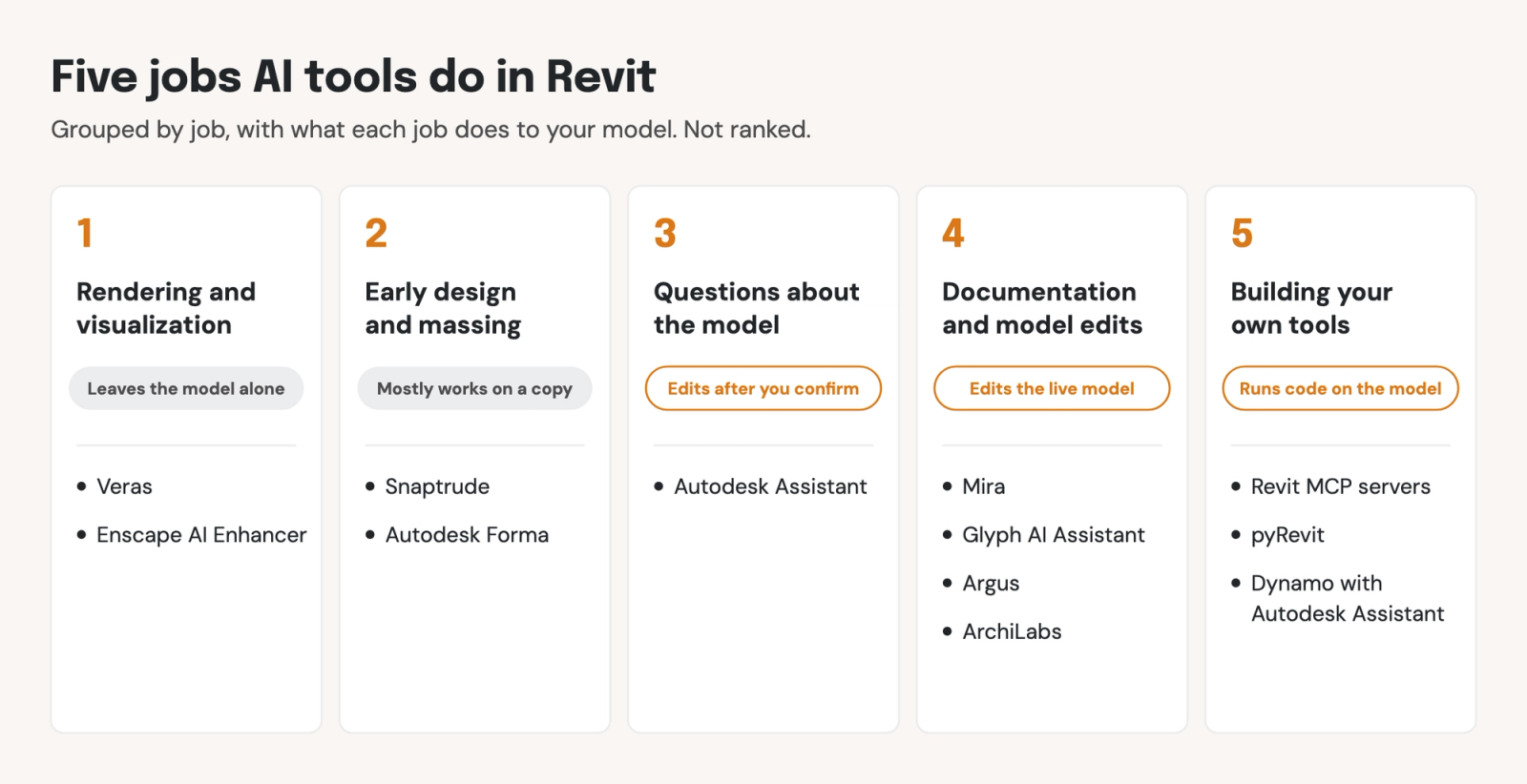
AI tools for Revit do five jobs: rendering, early design and massing, answering questions about the model, documentation and model edits, and building your own tools. We think you should start with the job that takes up most of your hours. Then, check what the tool can change in your model, and whether you're able to see and approve each change first.
Ask five questions before you install an AI tool
The useful test for an AI tool in Revit is what it does to your model, not how good its demo looks. We score each tool below against these five dimensions:
- Which Revit versions does it run in? An add-in loads only in the versions it was built for, so check yours before you install Revit plugins.
- Does it read the live model, or a copy? A tool that works from an export or an upload sees only what you send it, and its changes come back only when you import them.
- Can it change the model, and does it show you first? A tool that writes to the model should say what it will change and wait for your go-ahead before executing.
- Can you undo the whole change in one step? A batch edit you have to reverse one element at a time will be too cumbersome and unreliable to use on a live project.
- What leaves your machine, and is it used for training? Read the vendor's privacy page, then check it against your client contracts.
AI tools classified by the job they do
These are some of the most widely used AI tools for Revit, grouped by job:
Rendering and visualization
These tools turn a Revit view into images and leave the model alone, so versions and data matter most.
Veras (Chaos)
Veras turns your active 3D view into AI concept renderings and short videos.
- Works in: Revit 2021 to 2026 on its product page, and 2027 from Release 4.7. It reads the view's geometry, camera and materials.
- Changes the model: no. It works "without altering the underlying BIM geometry."
- Data: the camera view and a geometry snapshot go to the cloud. Chaos says the data isn't used for AI training, though its license keeps that option open.
Enscape AI Enhancer (Chaos)
Enscape renders live inside Revit, and its AI Enhancer improves the people and plants in a finished render.
- Works in: Revit 2023 to 2026, with preliminary support for 2027.
- Changes the model: no. The Enhancer edits the image.
- Data: only the rendered image and object masks go to Chaos Cloud, no geometry, and Chaos says they aren't used for training.
Early design and massing
These tools test options before the model is detailed, usually on a copy, so watch how changes come back to Revit.
Snaptrude
Snaptrude is a browser-based design app with AI features that moves models to and from Revit.
- Works in: Snaptrude lists workflows with Revit 2026. Each Revit upload becomes a new Snaptrude project.
- Changes the model: yes, when you import the Snaptrude file back into Revit. No preview step is described.
- Data: the model goes to Snaptrude's cloud, and Snaptrude says project data is "never shared or used to train models."
Autodesk Forma, from Revit 2027
Revit 2027 runs Forma's site context and wind analysis on cloud models stored in a Forma project.
- Works in: Revit 2027 (as a tech preview; Autodesk doesn't recommend using it for production projects).
- Changes the model: results show in views; Autodesk doesn't describe model edits.
- Data: models sit in Autodesk's cloud, in US, EU or Australian regions. Each AI feature has an AI transparency card saying what it trains on and whether you can turn it off.
Answering questions about the model
Autodesk Assistant in Revit 2027
Autodesk Assistant is a chat panel for how-to questions ("How do I create a section view?"), model queries ("Find all doors on Level 1") and edits ("Create a floor plan for Level 2").
- Works in: Revit 2027 only, as a tech preview, using context from your model. From 2027.2 it updates separately from Revit releases (Autodesk Help).
- Changes the model: yes. Autodesk says "You'll always confirm before Assistant changes your work." Its changes are labeled in the Undo menu and logged in the Revit journal, and a Stop button interrupts a run.
- Data: prompts and chat history are stored in the cloud with your Autodesk account. Autodesk says "None of this data, nor any customer privacy data, is used to train LLM models" (Autodesk Help). Its support article says it can't be disabled in Revit.
Documentation and model edits
Sheets, views, tags, notes and parameters take up most of a Revit user's hours. These tools work in the live model and change it, so preview and undo matter most.
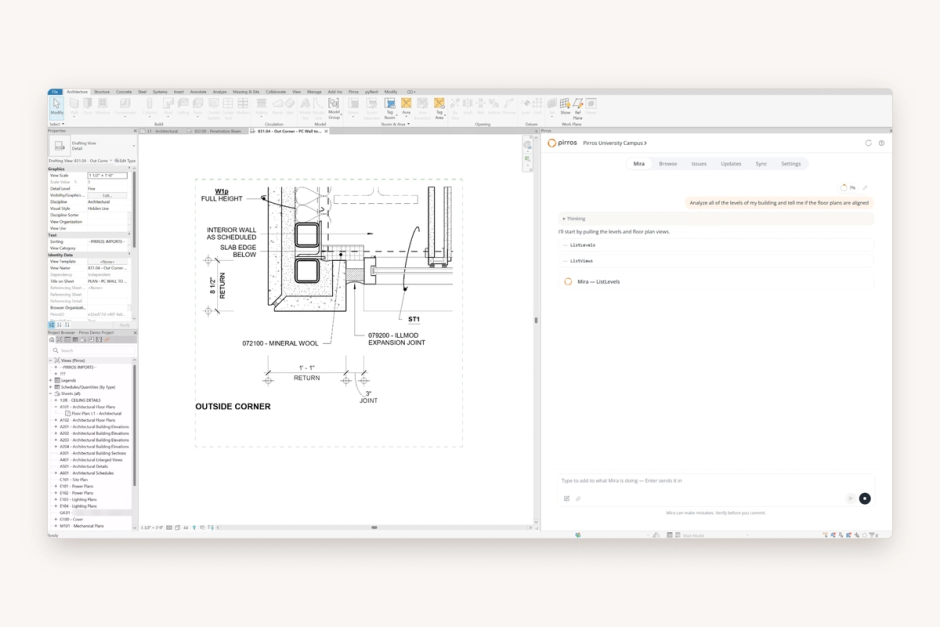
Mira (Pirros)
Pirros's AI agent for Revit, covered in its own section below.
- Works in: Revit 2025, 2026 and 2027 on Windows, reading the live model, your selection and the open view.
- Changes the model: yes, after you approve. Mira reads the model without asking, but asks before it changes anything. Most skills undo in one Ctrl+Z.
- Data: your selection, view and questions go to Mira's AI. The full model isn't uploaded, and Pirros doesn't use what's in your model to train models for other firms (Meet Mira).
Glyph AI Assistant (Chaos)
Glyph automates views, sheets, tags and dimensions, and its AI Assistant runs those tasks from plain-language requests.
- Works in: Revit 2020 to 2027, as an add-in. Chaos says model processing happens locally.
- Changes the model: yes. "Before changes are committed to the model, Glyph will provide a visual preview" (Glyph AI Assistant). Undo isn't described.
- Data: Chaos says only minimal metadata or prompt text goes to OpenAI's API, not the full model or views.
Argus (BIMLOGIQ)
Argus, the successor to BIMLOGIQ Copilot, is an AI agent that plans and runs multi-step Revit work from plain English.
- Works in: Revit 2022 to 2026 (BIMLOGIQ), reading elements, parameters, views, sheets and linked files in the live model.
- Changes the model: yes. Every generated command is shown first, and "nothing is written to disk or applied to the model without your approval." Undo isn't described.
- Data: its terms say data you upload may be shared with platforms including OpenAI and Anthropic. Its pages don't say whether it trains AI.
ArchiLabs
ArchiLabs Desktop is "an AI teammate for Revit" that creates and updates native model elements.
- Works in: Revit versions aren't listed on its Desktop page, which doesn't say whether it runs as an add-in.
- Changes the model: yes. No preview step is described, and its terms make the customer responsible for reviewing and approving outputs.
- Data: its terms name AI providers such as OpenAI, Anthropic and Google, and let customers opt out of AI model training with a setting.
Building your own tools
If someone at your firm scripts, AI can help write and run your own Revit tools. These need the most care, because they can run code against the model.
Revit MCP servers
MCP, the Model Context Protocol, is the open standard AI assistants such as Claude and ChatGPT use to connect to other software. A Revit MCP server connects an assistant to the model open on your machine.
- Autodesk's Revit Public MCP Server: a technical preview for Revit 2027.2 that runs locally. The Read version doesn't modify the model; Write and Experimental can, and Autodesk says to review proposed changes before accepting them and back up the model first (Autodesk Help).
- Open-source servers: the most-starred active project on GitHub, mcp-servers-for-revit, supports Revit 2020 to 2026 and can create, modify and delete elements and send C# code to Revit. Its README doesn't describe a preview or undo. A pyRevit-based version shows each model change for review in Revit before it runs.
- Data: the server runs locally, but the assistant you connect sends what it reads to its AI provider.
Pirros MCP (Pirros)
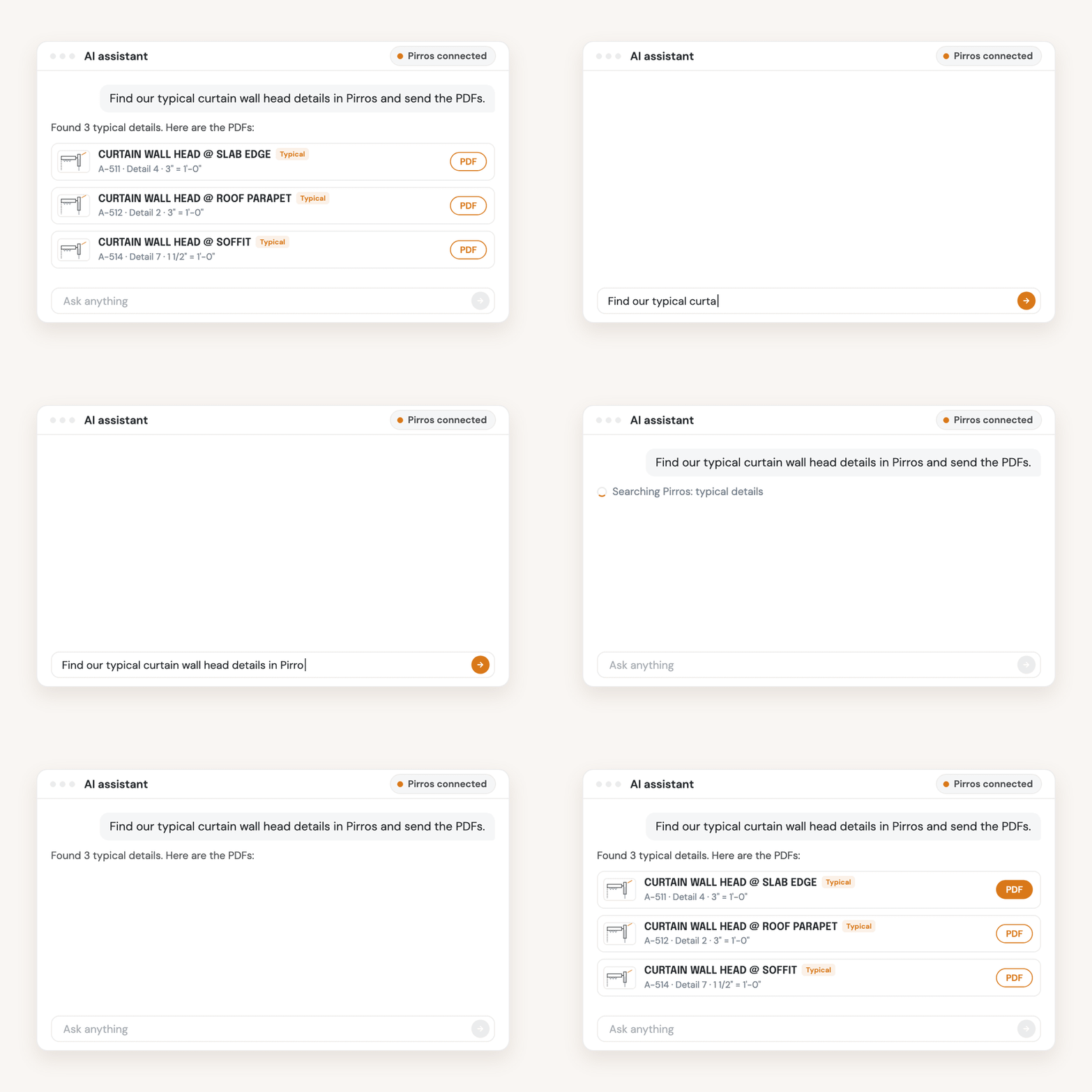
A Revit MCP server reaches the one model open on your machine. The Pirros MCP reaches every detail and family your firm has stored in Pirros, from the AI assistant you already use, without Revit open.
- Works in: Claude (claude.ai and Claude Code), ChatGPT, Cursor and Codex, once your firm's admin sets it up.
- Changes the model: no. It searches, opens and downloads details and families and can create stashes; it doesn't edit details, families or a Revit model.
- Data: the admin chooses which AI tools connect, which workspaces each one reaches and whether it can read, write or download. Pirros is SOC 2 Type II compliant.
pyRevit
pyRevit is a free, open-source framework for scripts and add-ins in Revit 2021 to 2027. Version 7 adds an experimental agent runtime that lets a coding agent work in Revit.
- Changes the model: changes are approved inside Revit by default, and Keep commits them as one undo entry. It's off by default and, per its docs, validated on Revit 2024 and 2025 so far.
- Data: whatever the agent reads goes to its model provider.
Dynamo with Autodesk Assistant
Dynamo 4.2 and later include Autodesk Assistant, which builds and edits Dynamo graphs from plain-language requests, connecting for Revit users from Revit 2027.3 (Dynamo Primer).
- Changes the model: only through the graph. The assistant "has no direct connection to the Revit model," and "Nothing changes until the graph runs."
- Data: it needs an Autodesk sign-in and a network connection.
Mira handles the repetition. You approve the result.
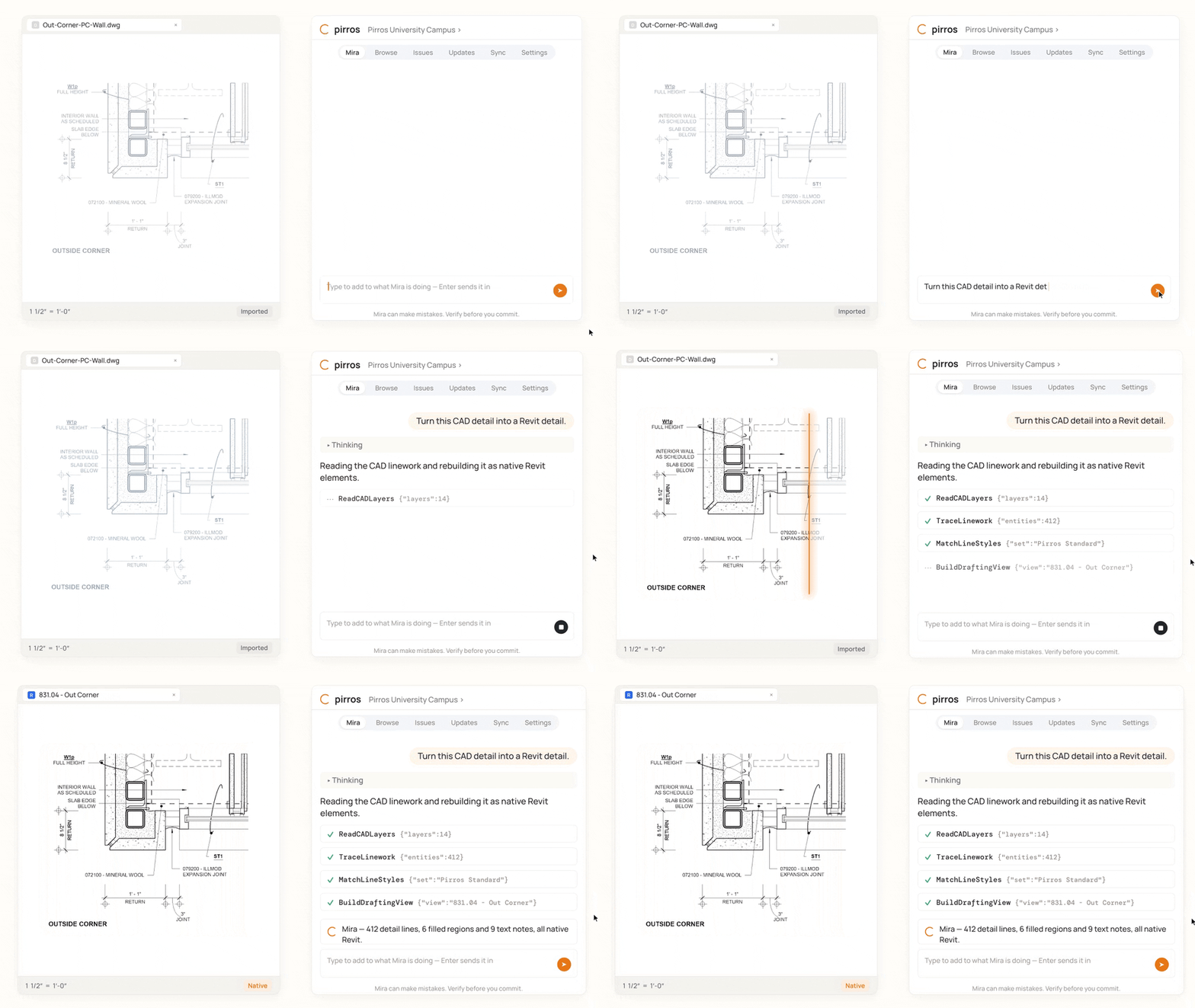
Mira, the AI agent for Revit, works inside your Revit session on Revit 2025 and later, and it's free to download. Mira automates the work you repeat and builds tools your team needs. You control it in plain words. It can explain how something in the model works, change the model, or build new elements from a description.
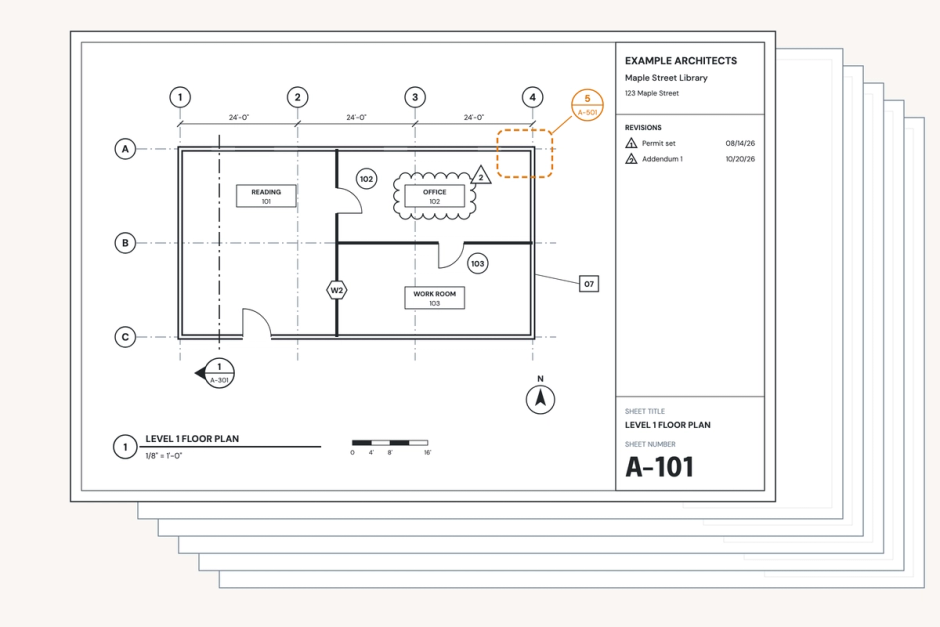
Mira is most useful on the jobs Revit leaves to you one element at a time. Pirros writes and maintains many skills for those jobs, such as:
- Renumber details on a sheet: "Renumber the details on this sheet."
- Annotation standards audit: "Audit this view against our standards. Here's our template."
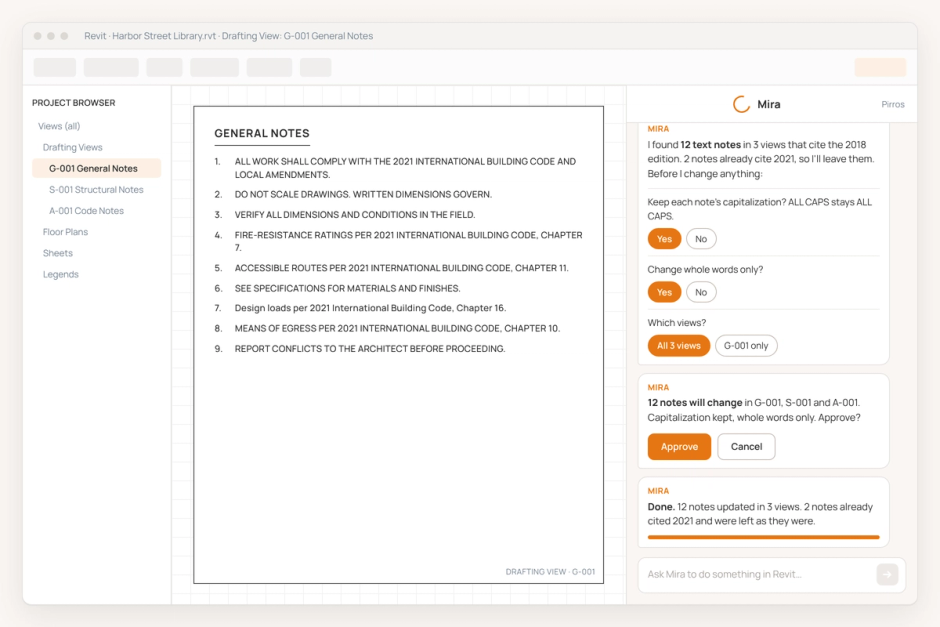
- Bulk text-note edits: "Replace 'Old Material Name' with 'New Material Name' in every text note."
- Set parameters in bulk: "Update the door instance parameters from this table. Each row's Mark is the target."
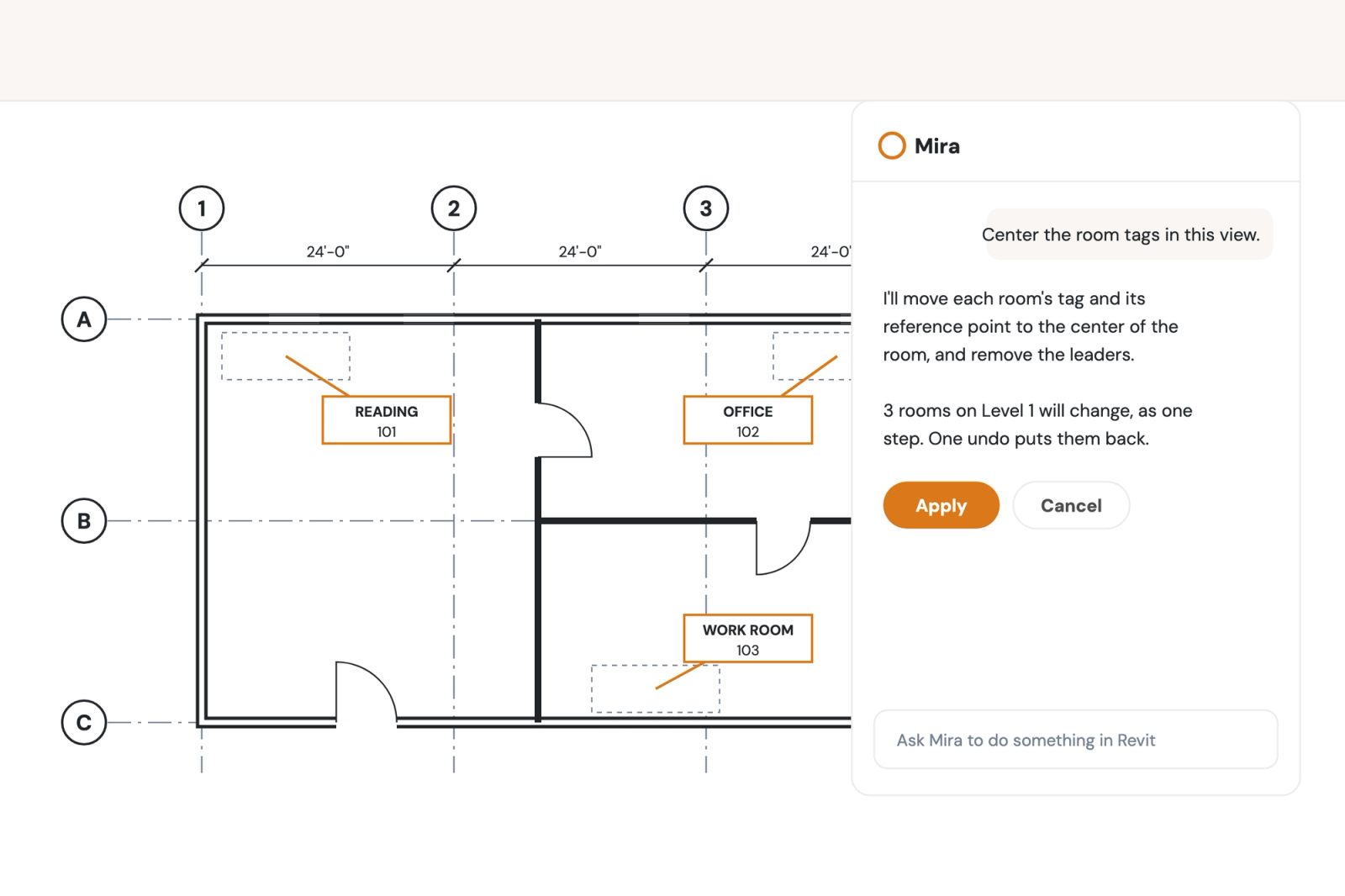
- Center room tags: "Center the room tags in this view."
- Flip grid heads: "Flip the grid heads on these grids, then do the same on the other floor plans."
Every skill works the same way. Mira looks at the sheet, view or selection and tells you what it found. It shows a preview and doesn't touch the model until you approve. It checks the result and names anything it skipped, with the reason. Most skills make the whole change as one step, so one Ctrl+Z reverses it.
Successful cross-firm collaboration with AI tools
One person trying an AI tool is easy. Getting the same good result on every project is harder, for reasons specific to Revit:
- Every desk has different tools. Each Revit version reads its own add-ins folder, and Add-Ins Manager settings are per Windows user, so two people on one project can have different AI tools loaded.
- Prompts stay with one person. The prompt that renumbered a sheet well lives in one chat history, and the next project starts over.
- Nobody can say what data left the office. Client drawings pasted into a consumer chatbot may be stored or used for training, depending on the tool.
- Changes without a preview leave QA/QC nothing to check. If a tool writes to the model without a plan or a record, a reviewer can't tell what changed.
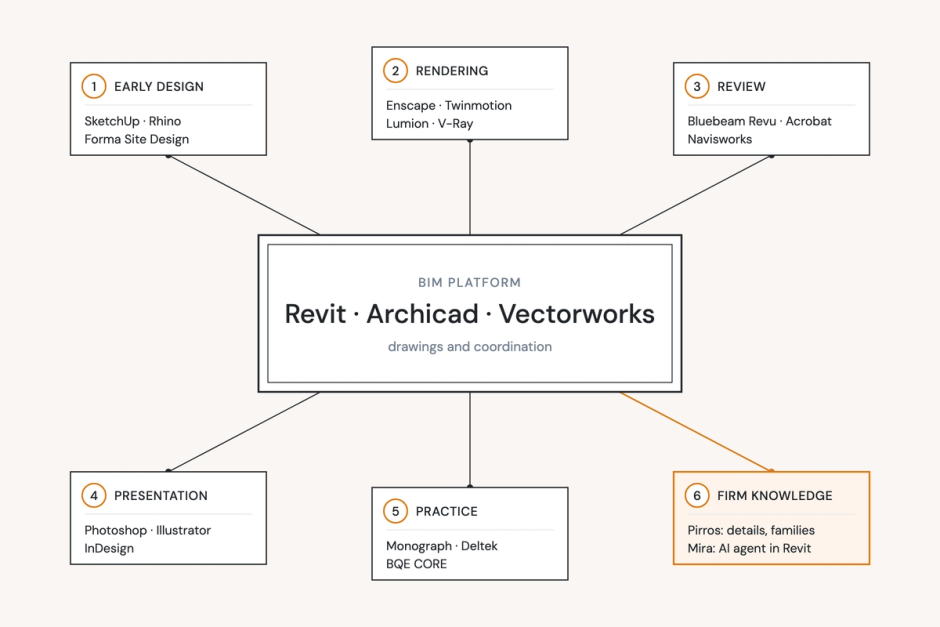
The fix is a short firm rule, owned by the BIM manager: one approved tool per job, what project data may go into each, and a preference for tools that show their plan and undo in one step. In Revit 2025.4 and later, the (Admin) Add-Ins Manager can lock add-ins on or off for every user. For AI across the whole project, not just Revit, see AI for architecture. For the rest of a firm's software, see our guide to the best software for architects.
Try one on a real sheet
Pick the job that takes most of your week and try one tool on it, on a copy of a real project. Try Mira free: it runs in Revit 2025 and later. If your firm is rolling AI out to whole teams, book a demo and we'll show you how Pirros keeps everyone working from the firm's own standards.