AI Plan Review: Check Your Set Before the City Does
What AI plan review is, how building departments use it, and how architects can check a drawing set against the code before submittal, with a person deciding.

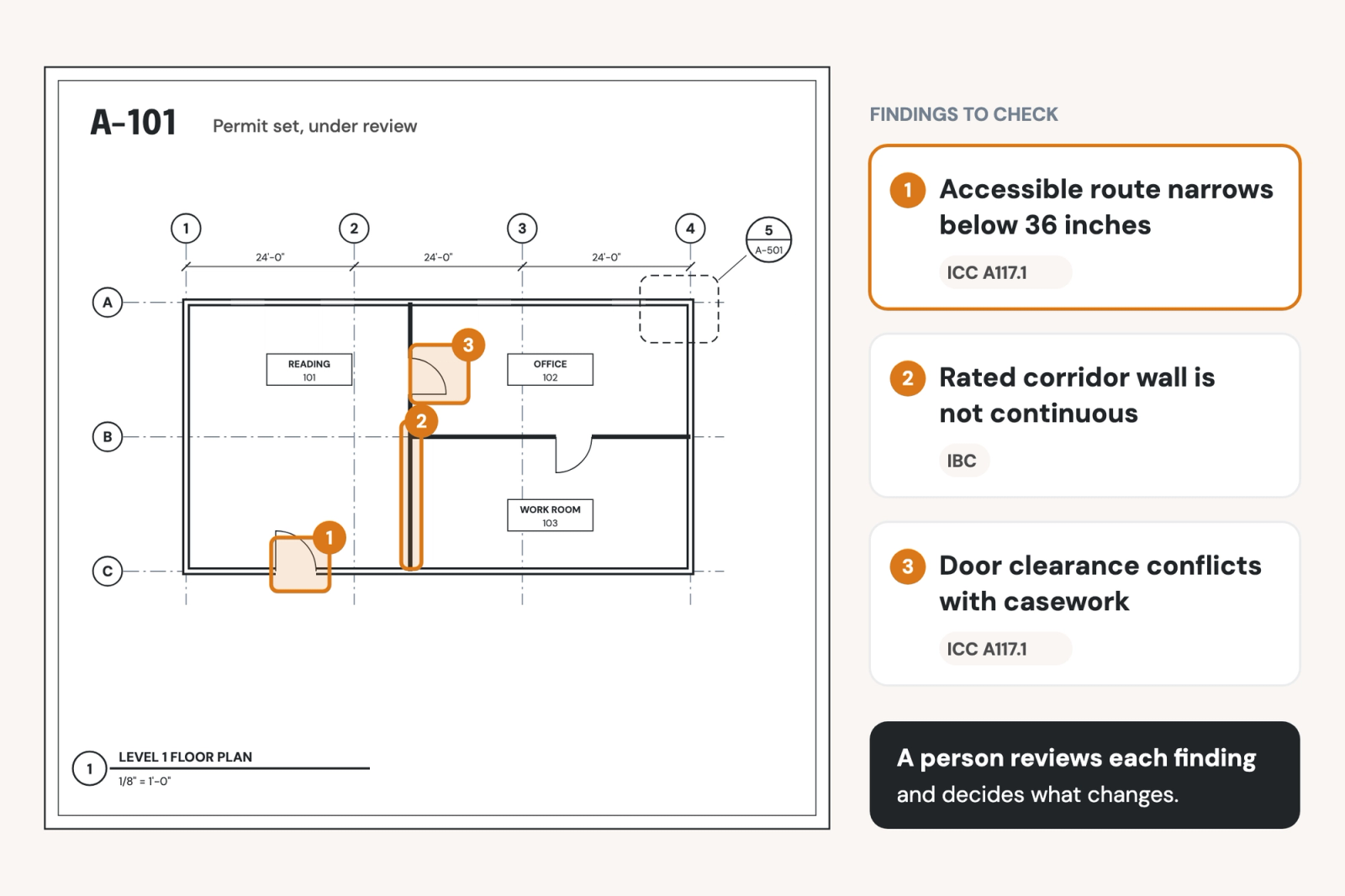
Architects and local building departments are rapidly adopting AI plan review software, which reads a drawing set and flags likely code issues before or during permit review. Building departments use it to speed up their own checks, and architects can run the same kind of check on their own set to catch errors before submittal. The software flags what to look at; a licensed professional still decides what changes to make in the plans.
As building departments adopt AI tools to screen applications, the quality of the submitted set matters more, not less: a set with missing information gets sent back to the design team faster, and every round of comments adds time to the pre-construction schedule, delaying the build.
This guide explains AI plan review on both sides of the permit counter, what it checks well and what it can't, and how a firm can check its own set against the same codes before it submits.
What is AI plan review?
AI plan review refers to software that reads a drawing set, compares what it finds against the requirements of a building code, and produces a list of likely issues for a person to check. Many of these tools read the drawings as images, as well as text, so they can find conditions that aren't spelled out in a note, such as a door clearance or an accessible route on a plan.
The software doesn't approve or reject anything. On the department side, a plan reviewer still issues the comments and the permit. On the architect's side, the project team still decides what changes and the architect of record still signs the drawings.
Two sides of the counter
The same kind of software serves two different users.
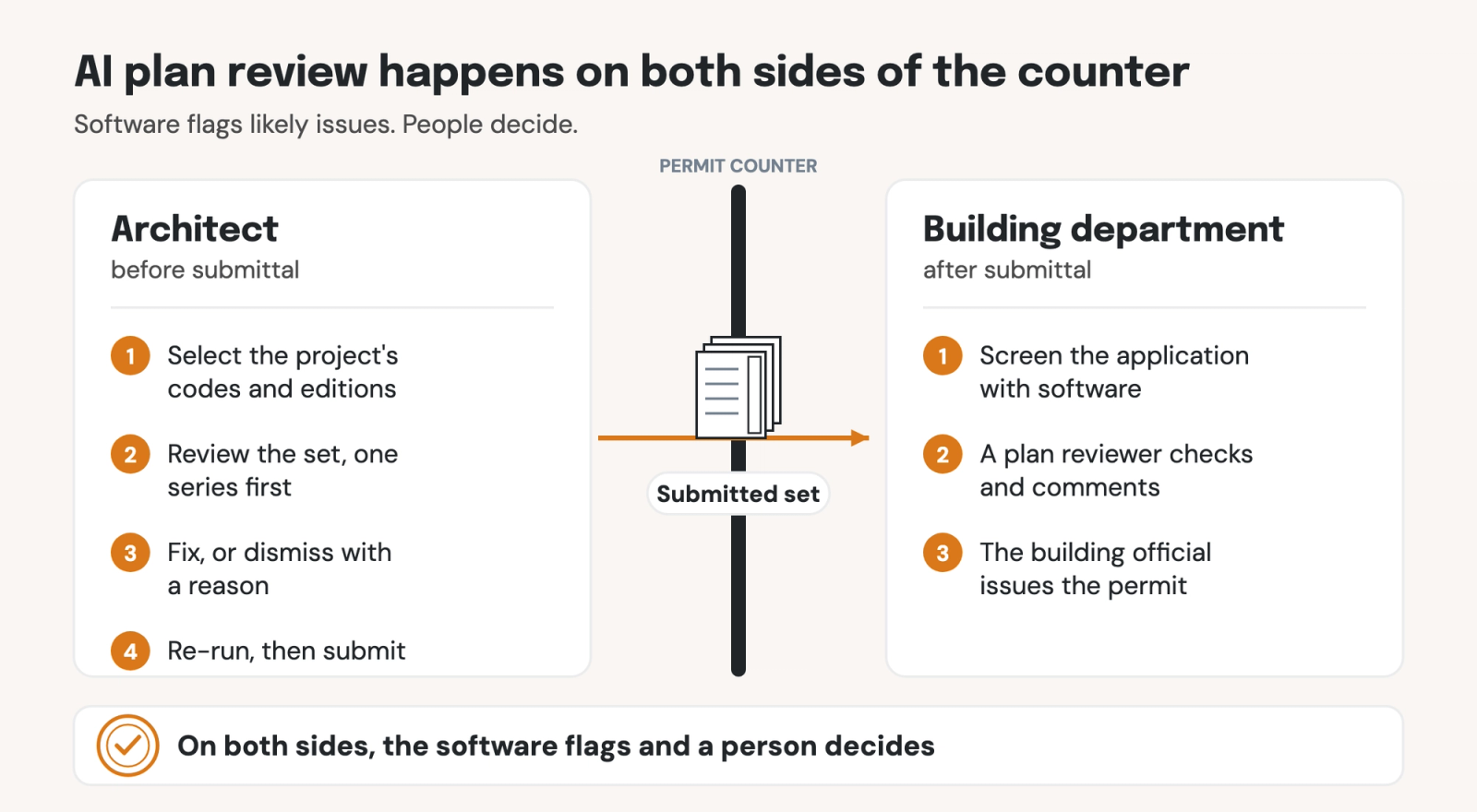
Building departments
Many building departments are buying AI plan review to cut permit backlogs. In Honolulu, the Department of Planning and Permitting uses CivCheck, a tool from Clariti, on residential permit applications. As StateScoop reported, the department's director said the tool flags possible code issues, identifies missing information and highlights potential problem areas for both applicants and reviewers, and that it has helped cut residential review times by roughly 60%. The department has since offered faster review to applicants who screen their projects through the tool, ahead of making it mandatory.
Other vendors, such as Archistar and CodeComply.Ai, sell similar tools to local governments. For architects, the takeaway is that more departments will run software over a submittal before a person reads it.
Architects, before submittal
The architect's version runs the same kind of check earlier, on the firm's own set, against the codes that govern the project. The goal isn't to predict every comment a plan reviewer will make. It's to make sure the comments that do come back reflect actual design questions, not missing information or overlooked building code requirements.
What AI plan review checks well, and what it can't do
AI plan review is effective for checks that can be traced to a written requirement or a drawing convention. It works best on:
- Code requirements: Clearances, widths, ratings and other requirements from the codes selected for the project, each linked to the clause it comes from
- The firm's standards: Departures from the firm's own written standards, such as how a condition must be detailed or tagged
- The specification: Conflicts between what the drawings show and what the spec covers
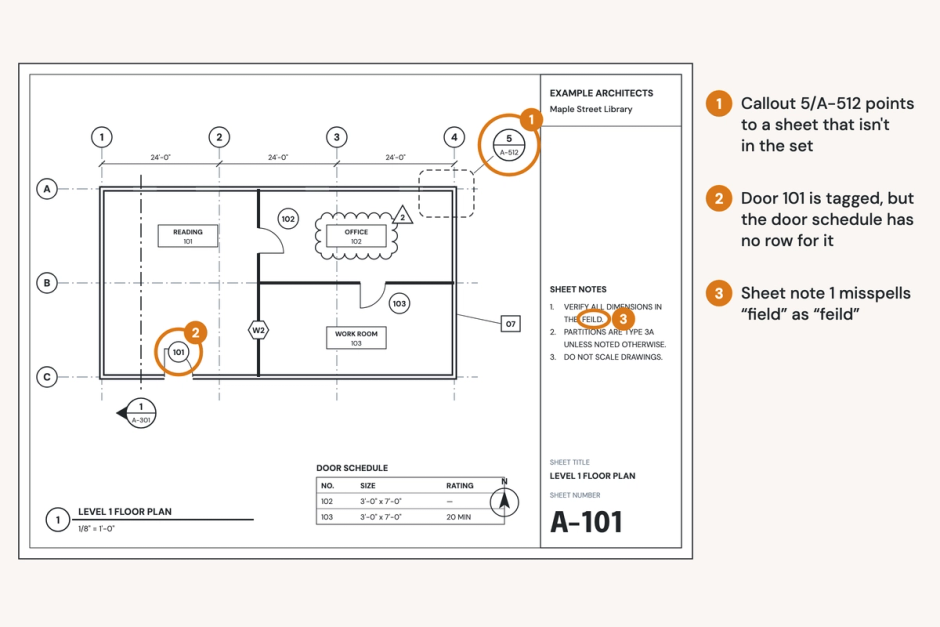
- Drawing conventions: Missing references, details that are never referenced, spelling and inconsistent tags
- Coordination between sheets: A plan, a schedule and a detail that disagree about the same element
AI plan review is not able to determine:
- Design intent: Whether the building does what the client asked for
- Judgment calls: Interpretations where the code leaves room, alternative means and methods, and conversations with the building official
- The stamp: Responsibility for the drawings stays with the architect or engineer of record
How to check your set before you submit
A pre-submittal review works best as a short, repeatable routine:
- Select the codes that govern the project: Choose the code, the edition and any local amendments that apply. Selecting every available code produces findings against codes that don't apply, which the team then has to dismiss one at a time.
- Load the specification: A review with the spec loaded can resolve conflicts between the drawings and the spec that a drawings-only review has to leave alone.
- Review one series first: A full permit set produces a long list. Start with the series most likely to draw comments, such as the life safety plans or the A200 series.
- Sort the findings by severity: Work the high-severity issues first, then move through the rest by sheet number.
- Dismiss with a reason: Record why an issue doesn't apply, so the decision is visible to the next reviewer and to anyone who asks later.
- Run it again before submittal: Re-run the review on the final set to confirm the changes landed and nothing new appeared.
When plan review goes wrong across a firm
Most firms answer plan-check comments one project at a time, which creates two problems:
- The same comments come back project after project: A missing accessible route detail or an unrated corridor wall gets caught by a city reviewer on one project and corrected when revisions are made. But if the broader firm doesn't learn about the oversight and carry the lesson forward, the same error will be made in future projects also.
- Nobody can show which checks ran before submittal: If a comment raises a question later, the firm has no record of what was reviewed, what was flagged, and why an issue was set aside.
A pre-submittal review that runs the same way on every project, with a record of what it found and what the team decided, addresses both.
How Pirros checks a set before submittal
The Quality Management System, Pirros's AI-powered QA/QC product, runs this pre-submittal check through Project Review. You select the codes for each project from the IBC, ADA, AISC and regional codes that Pirros processes centrally, so nobody has to find or upload a code book. Reviews also check the firm's uploaded standards and the references you load, such as the specification and consultant drawings.
Each code issue is labeled with the code it came from and links to the specific clause, so the reviewer can read the exact text a finding rests on. The review checks the drawing set first, then consults the model, the spec and the consultant drawings to resolve anything the drawings leave unclear. For example, if a dimension needed to confirm an accessible clearance is missing from the plan, the review measures the condition in the model and cites both the drawing and the model in its reasoning.
The team stays in control. Every issue carries a severity, can be assigned to whoever owns that scope, and can be dismissed with a reason. Dismissals persist on later runs of the same review, and on a model linked from Autodesk Forma or Autodesk Construction Cloud, reviews can run on a daily, weekly or monthly schedule against a submittal milestone. Nothing changes in the set until a person says so.
Number TEN Architectural Group, a Winnipeg firm that works across provincial lines, chose the Alberta Building Code and the National Building Code for its reviews. On a project with a tight schedule to go out to bid, reviewing the set against the current building code surfaced sloped glazing and safety glass requirements that had been omitted, and the team carried them straight into the specification.
For the rest of the QA/QC process, see our Revit QA/QC guide.
Book a demo to see what a review finds in one of your sets, or try Mira free in Revit.